

WhatsApp allows users to share videos with friends, family, colleagues, and groups. However, standard video sharing may reduce video quality, making clips appear blurry or less detailed.
Learning How to send HD videos on WhatsApp helps you preserve more visual details while sharing memorable moments, tutorials, travel clips, and professional recordings. WhatsApp offers an HD media option, while document sharing preserves the original file.
Why Does WhatsApp Reduce Video Quality?
WhatsApp compresses media files to speed up sharing and reduce data usage. Compression can reduce resolution, bitrate, and other video details, especially when the original recording is high-resolution.
This process makes videos easier to send through different internet connections. However, compression can reduce sharpness, color, and fine details, especially in videos recorded with modern smartphones and advanced cameras.
How to Send HD Videos on WhatsApp on Android
Sending HD videos on Android is simple if the latest WhatsApp version supports HD sharing. Open an individual chat or group conversation, tap the attachment icon or camera option, and select the video you want to share.
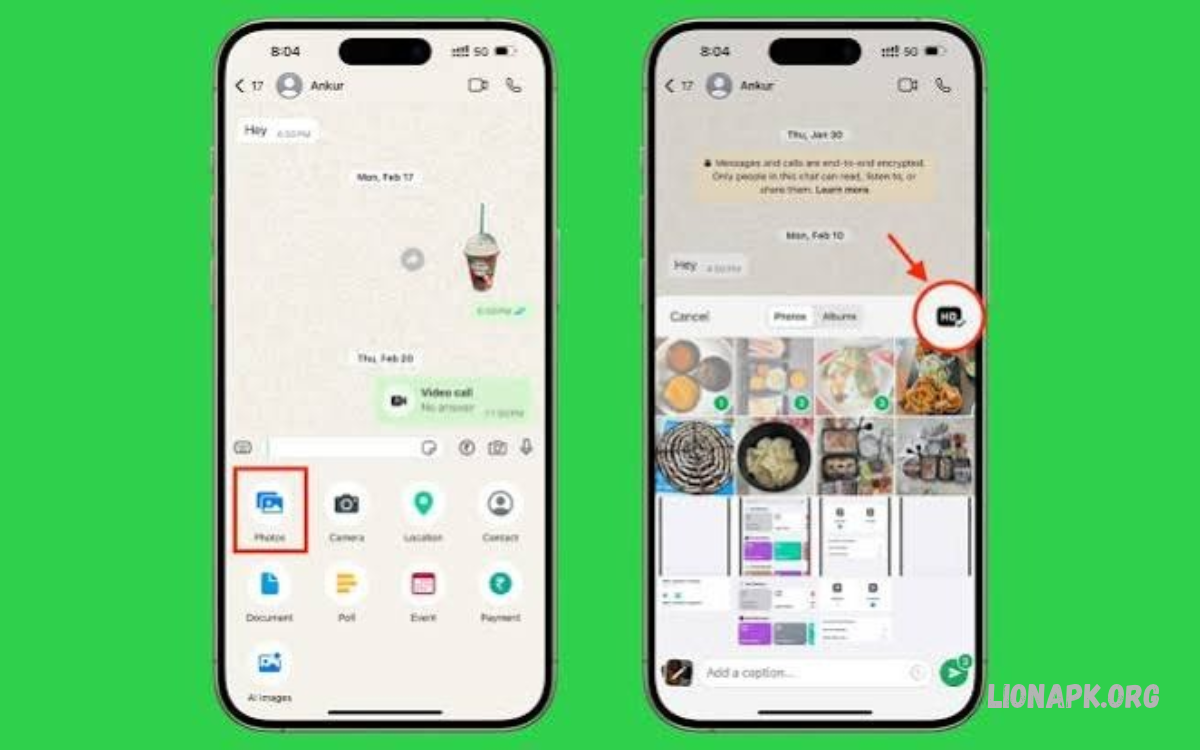
After selecting the video, look for the HD button near the top of the preview screen. Tap HD, choose the available high-quality option, review the video, and press Send. The recipient can then view the video with better quality than standard compressed sharing.
How to Send HD Videos on WhatsApp on iPhone
iPhone users can also share higher-quality videos through WhatsApp’s built-in media settings. Open WhatsApp, select a conversation, tap the plus button, choose Photos or the relevant media option, and select the video from your library.
When the preview screen displays an HD option, tap it and select HD quality before sending. The exact interface may vary according to the WhatsApp version and iOS release, so update the app if the option is missing.
How to Use the HD Video Option
The HD option allows you to select a higher-quality version of a video before sharing it. It is particularly useful for clips containing small text, detailed scenery, moving objects, or important visual information that may become less clear after standard compression.
Keep in mind that HD does not always mean completely original quality. WhatsApp may still compress the video, and the final resolution depends on the source file, supported settings, and available processing options.
How to Send Videos Without Losing Original Quality
If preserving the original video file is more important than using the regular media preview, consider sending the video as a document. Document sharing generally avoids the additional media compression applied to ordinary video sharing and can preserve the original file when it is uploaded successfully.
On Android, open the chat, tap the attachment icon, select Document, and choose the video file. On iPhone, use the plus button and select Document, then browse the available files in the Files app. Select the video and send it as a file attachment.
How to Send HD Videos on WhatsApp Using the Document Method
The document method is helpful when you want to share a video in its original resolution, frame rate, and encoding. It can be especially useful for editing projects, educational recordings, business presentations, and important personal videos that require better preservation.
First, locate the video in your phone’s file manager or save it to the Files app on iPhone. Open WhatsApp, enter the recipient’s chat, choose Document, select the video, and confirm the upload. The recipient can download the file and play it using a compatible video player.
HD Quality vs Standard Quality on WhatsApp
Standard quality is suitable for everyday clips when fast sharing and lower data consumption are priorities. HD quality provides greater visual detail, making it a better choice for scenic videos, demonstrations, and recordings where clarity matters.
Document sharing is often the better option when the original file must remain unchanged. Unlike regular video sharing, it is intended to transmit the file itself rather than optimize it as a conventional media attachment, although upload limits and device compatibility still apply.
How to Enable HD Media Quality in WhatsApp Settings
WhatsApp may provide a default media upload quality setting that allows you to choose between Standard and HD. This can reduce the need to select HD manually every time you share a video, depending on your app version and the media-sharing workflow.
Open WhatsApp Settings and look for Storage and Data or a media upload quality setting. If an option such as Media upload quality is available, select HD quality. Menu names and availability may vary, so check the latest version if your settings look different.
How to Send HD Videos on WhatsApp Without an HD Button
Sometimes the HD button does not appear when selecting a video. This can happen because of an outdated application, an unsupported file, an interface change, or a temporary issue with the media preview screen.
Update WhatsApp through the official Google Play Store or Apple App Store, reopen the application, and select the video again. If the option remains unavailable, send the file as a document to preserve its original quality where supported.
How to Send Large HD Videos on WhatsApp
Large videos require more storage space, upload time, and mobile data than smaller clips. Before sharing a lengthy recording, check the file size and confirm that your internet connection is stable enough to complete the upload without interruption.
WhatsApp’s supported file-size limits can change over time and may depend on the sharing method. If a video exceeds the limit, consider splitting it into smaller sections or using a trusted cloud storage service and sharing a download link with the recipient.
How to Send 1080p Videos on WhatsApp
Videos recorded in 1080p offer Full HD resolution and can display clear details on compatible phones, tablets, and computers. To preserve as much detail as possible, select the HD option when available or send the original video through the document method.
Remember that choosing HD does not guarantee that every video will be delivered at precisely 1080p. The available resolution depends on the original recording, WhatsApp’s processing, and the selected sharing method. Check the received file’s properties if exact resolution matters.
How to Send 4K Videos on WhatsApp
Many modern smartphones record videos in 4K resolution, which contains more pixels than Full HD footage. These recordings can produce impressive results, but their file sizes are often significantly larger, making them less convenient to upload and download.
For better preservation, send the original 4K file as a document if the file-size limit permits. Alternatively, upload it to a reputable cloud service and share a restricted link with the intended recipient. Verify that the recipient has permission to access and download the file.
How to Maintain Video Quality Before Sending
Good video quality begins before you open WhatsApp. Record using an appropriate resolution, keep the camera lens clean, use sufficient lighting, and avoid excessive digital zoom. Stable footage also makes the final video easier to watch.
Whenever possible, share the original recording instead of a version downloaded from another messaging app. Repeated compression can reduce detail further, so starting with the original file and choosing an appropriate sharing method usually produces better results.
Best Internet Connection for Sending HD Videos
A stable Wi-Fi connection can make uploading large video files more convenient and help prevent interruptions. Mobile data also works, but uploading HD or 4K footage may consume a considerable amount of your data allowance.
If a video upload becomes stuck, check your connection and available storage, then reopen WhatsApp if necessary. Avoid repeatedly sending the same large file while an upload is still processing, as this may create duplicate attachments or waste data.
How to Send HD Videos to WhatsApp Groups
You can share HD videos with multiple people through WhatsApp groups using the same media-sharing process available in individual chats. Open the group, select the video, choose HD when the option appears, and send it after checking the preview.
For important recordings that must retain their original quality, consider sending the video as a document instead. Remember that group members may have different devices, internet speeds, and storage capacities, which can affect how quickly they download and view large files.
How to Send HD Videos on WhatsApp Web
WhatsApp Web lets you share videos from a compatible browser on your computer. Open WhatsApp Web, choose a conversation, click the attachment icon, and select Photos and Videos or the document option, depending on how you want to share the file.
For standard media sharing, select the HD option if it appears in the preview. To preserve the original file, select the document attachment option and upload the video from your computer. Confirm the selected filename before sending it to avoid sharing the wrong recording.
Read Also: How to Restore WhatsApp Chats on Android and iPhone
How to Send HD Videos Using WhatsApp Desktop
WhatsApp Desktop provides a convenient way to send video files stored on your computer. Open the desktop application, select the recipient, click the attachment icon, and choose the relevant media or document option.
If the video is large, ensure that your computer remains connected to the internet throughout the upload. Sending the original file as a document is particularly useful for work-related footage, tutorials, and recordings that need to be transferred without ordinary media compression.
Common Problems When Sending HD Videos
Some users cannot find the HD option, experience failed uploads, or notice that a video appears less clear after delivery. These problems can result from outdated software, unsupported media, weak internet connections, or compression that still occurs when HD sharing is selected.
Start by updating WhatsApp, checking your connection, and selecting the original video again. If the quality remains unsatisfactory, try sending the file as a document. Also check whether the recipient is viewing a downloaded copy or a preview that may not immediately show the full-resolution file.
How to Fix Blurry Videos Sent Through WhatsApp
A blurry video may result from standard compression, low recording resolution, poor lighting, or an already compressed source file. Sending the same low-quality recording through the HD option cannot restore details that were lost before the video reached WhatsApp.
Choose the original recording whenever possible and use HD sharing or document attachment. Ask the recipient to download the complete file and view it in a compatible player. A reliable connection can also help ensure that the file finishes downloading before playback begins.
Does Sending HD Videos Use More Data?
Yes, sending higher-quality videos generally requires more data because the files can be larger than standard-quality versions. The exact amount depends on the video length, resolution, bitrate, frame rate, and the degree of compression applied during sharing.
If your mobile data allowance is limited, use Wi-Fi for large uploads and downloads whenever practical. You can also reserve HD or document sharing for important recordings and use standard quality for casual clips where maximum detail is unnecessary.
How to Choose the Best Method for Different Videos
For short clips shared with friends, the regular HD option provides a convenient balance between clarity and ease of use. It lets recipients view the video directly in WhatsApp while retaining more detail than standard-quality sharing when supported.
For original camera footage, work projects, or videos that need to be edited later, document sharing is often more appropriate. For exceptionally large files, cloud storage can be a practical alternative, particularly when the recipient needs a downloadable copy of the original recording.
Safety Tips When Sharing HD Videos
Before sending a video, check that the recipient or group is correct. Videos may contain private conversations, personal details, location clues, or other information you do not want to share with unintended viewers.
When using cloud storage, review the sharing permissions and avoid creating public links for private recordings. Use trusted services, keep your account secure, and provide access only to people who need the file. These precautions are especially important for personal and professional videos.
Frequently Asked Questions
How do I send HD videos on WhatsApp?
Open a WhatsApp conversation, select a video, tap the HD option if available, choose HD quality, and press Send. For original file preservation, use the document attachment method.
How can I send videos on WhatsApp without losing quality?
Send the original video as a document when supported. This method generally avoids ordinary media compression and is useful when you need to preserve the original file.
Can I send 4K videos on WhatsApp?
You may be able to share 4K videos through supported media or document attachments, subject to current file-size limits. Sending the original file as a document or sharing a cloud link can help preserve its quality.
Why is the HD option missing on WhatsApp?
The option may be unavailable because of an outdated app, unsupported media, or an interface change. Update WhatsApp and try selecting the video again, or send it as a document.
Does WhatsApp HD mean original quality?
No. HD generally means higher quality than standard media sharing, but the video may still be compressed. Sending the original file as a document is usually preferable when preserving the source file matters.
Can I send HD videos on WhatsApp using an iPhone?
Yes. Select a video in a WhatsApp chat, choose HD when available, and send it. You can also share the original file through the Files app as a document.
Can I send HD videos on WhatsApp using Android?
Yes. Open a chat, select the video, choose HD from the preview screen if available, and send it. For original-file sharing, select Document from the attachment menu.
How do I send a large video on WhatsApp?
Check the current file-size limit and your internet connection before uploading. If the video exceeds the supported limit, split it into smaller clips or share it through a trusted cloud storage service.
Does WhatsApp reduce video quality automatically?
Standard media sharing can compress videos to make transfers more efficient. Selecting HD may improve the result, while document sharing generally preserves the original file better.
Is sending a video as a document better than HD sharing?
It depends on your goal. HD sharing offers convenient playback inside WhatsApp, while document sharing is often better for preserving the original file for downloading, editing, or archiving.
Conclusion
Learning how to send HD videos on WhatsApp makes it easier to share clearer recordings with friends, family, colleagues, and groups. The HD option lets you improve video quality without changing your usual sharing process.
When preserving the original recording is essential, use the document attachment method or a trusted cloud storage link. Choose the method that fits your video size, internet connection, and quality needs for more reliable, convenient sharing.
