

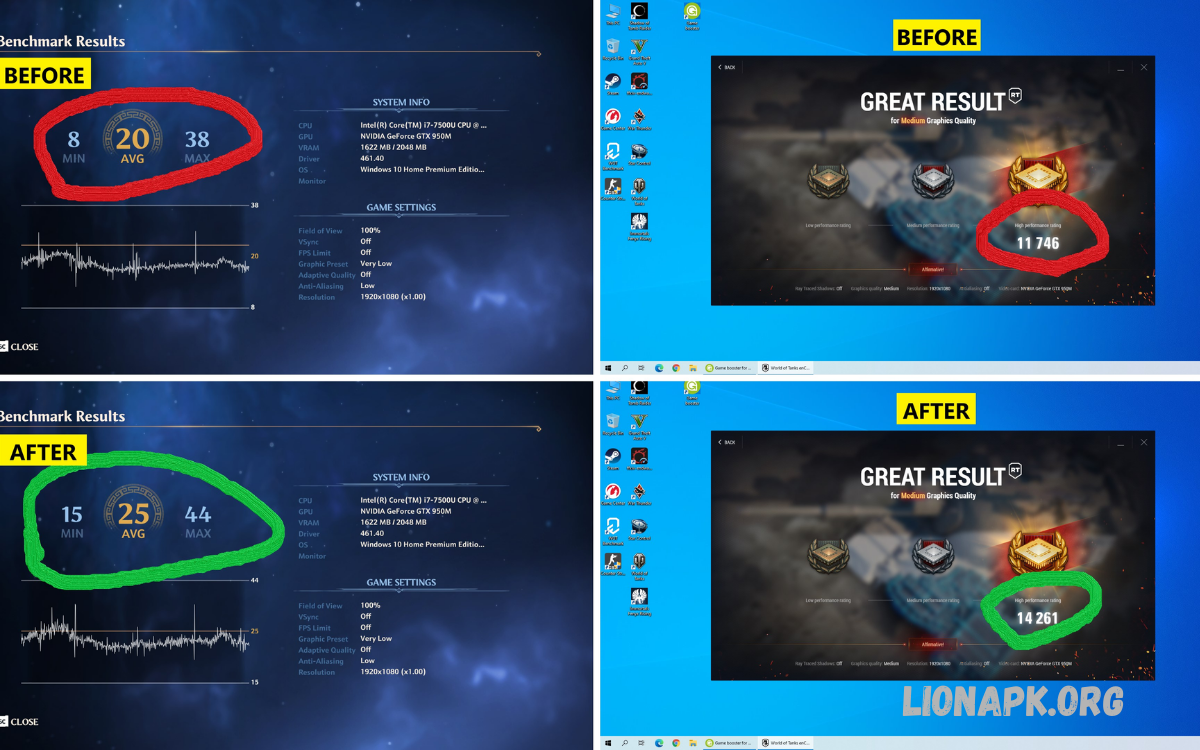
Gaming Booster Apps have emerged as essential tools for gamers seeking enhanced performance, smoother gameplay, and optimized system resources. Modern games demand significant processing power, high-speed memory access, and efficient GPU performance, making software optimization a practical complement to hardware upgrades.
These apps also enhance network stability by reducing latency and optimizing connection speeds, creating a seamless online gaming experience. Many applications include real-time monitoring features, such as FPS tracking and performance analytics, allowing gamers to identify bottlenecks and adjust settings for peak performance.
Understanding Gaming Booster Apps
Gaming booster apps are software tools designed to optimize system performance for gaming. Unlike standard utilities, these applications specifically target resource allocation, memory management, and background process prioritization. Primary functions include:
- Memory Management: Cleansing RAM, freeing memory, and closing non-essential applications.
- CPU and GPU Optimization: Prioritizing processing power and graphics performance to improve FPS (frames per second).
- Network Optimization: Reducing latency, stabilizing ping, and improving online gameplay experiences.
- Notification Blocking: Preventing interruptions during gameplay for uninterrupted focus.
- Temperature and Power Management: Monitoring hardware stress and managing performance to prevent overheating or throttling.
Effectiveness varies depending on device hardware, operating system, and specific application design. Users should understand that gaming booster apps supplement, not replace, hardware capabilities.
Types of Gaming Booster Apps
Gaming booster apps generally fall into two categories: system optimization utilities and dedicated gaming modes integrated into devices.
1. System Optimization Utilities
These applications operate across multiple devices and platforms. Their primary functions include closing background tasks, managing memory usage, and adjusting system settings for improved performance.
- Razer Cortex: Game Booster (Windows): Prioritizes CPU and memory for gaming sessions, displays FPS overlays, and optimizes system resources automatically.
- Wise Game Booster (Windows): Detects games installed on the system, terminates unnecessary background processes, and provides lightweight optimization features.
- Game Fire (Windows): Offers advanced performance tuning with custom profiles, memory management, and real-time system tweaks.
- Smart Game Booster (Windows): Combines system optimization with GPU tuning options, including fan curve adjustments and performance prioritization.
2. Built-In Device Gaming Modes
Modern smartphones and some computers include native gaming booster functionalities, providing optimization without third-party applications.
- Samsung Game Booster: Monitors CPU, RAM, and network usage, blocks notifications, and tracks FPS during gameplay.
- Xiaomi Game Turbo: Optimizes system resources, manages temperature, and prevents interruptions.
- OnePlus Fnatic Mode: Enhances performance by limiting background processes, prioritizing CPU/GPU resources, and blocking alerts.
- Realme Game Space: Provides customizable game profiles, resource allocation, and performance monitoring.
Native solutions often outperform third-party apps because of deeper integration with operating systems and firmware.
Gaming Booster Apps for Windows PCs
Windows PCs remain the most popular gaming platform, offering extensive software and hardware customization. Gaming booster apps for PCs generally focus on memory optimization, CPU/GPU prioritization, and background task management.
- Memory Optimization: RAM cleansing prevents system slowdowns during resource-intensive games.
- CPU/GPU Prioritization: Ensures games receive maximum processing power while other applications remain secondary.
- FPS Monitoring: Provides real-time data on frame rates and performance metrics to identify bottlenecks.
- Background Task Management: Closes unnecessary applications, freeing system resources for gaming.
Popular Examples: Razer Cortex, Wise Game Booster, Game Fire, Smart Game Booster.
Advanced users may combine gaming booster apps with GPU tuning software like MSI Afterburner to overclock GPUs safely, monitor temperatures, and enhance visual performance.
Gaming Booster Apps for Android Devices
Mobile gaming has surged globally, making Android optimization a priority for users seeking competitive advantages or smoother experiences. Gaming booster apps on Android function by managing RAM, limiting background applications, and adjusting CPU/GPU usage.
Third-Party Solutions
- Game Booster 4x Faster: Provides one-tap optimization, RAM clearing, and CPU prioritization for improved game performance.
- Dr. Booster: Monitors device performance, reduces overheating, and minimizes lag during gameplay.
- GFX Tool / GFX Tool Pro: Allows users to customize resolution, FPS caps, and graphics quality for specific games.
- Game Mode Pro / Gaming Mode: Offers customizable profiles, Do Not Disturb integration, and multitasking optimization.
- Nox Cleaner & Game Booster: Combines system cleaning with game-specific performance enhancements.
Read Also: Best Video Editing Apps Without Watermark – Professional Results
Native Gaming Modes
Android device manufacturers have integrated gaming booster functions into their operating systems, providing reliable, low-overhead performance improvements. Examples include:
- Samsung Game Booster
- Xiaomi Game Turbo
- OnePlus Fnatic Mode
- Realme Game Space
Native modes often provide better results than third-party apps due to system-level integration. They can block notifications, optimize memory allocation, and track FPS in real-time without additional resource consumption.
Gaming Booster Apps for iOS Devices
iOS architecture restricts third-party applications from accessing low-level system functions. Therefore, dedicated gaming booster apps for iPhones or iPads are limited. Optimization relies on native features and general-purpose system utilities.
Optimization Techniques
- Closing background applications manually.
- Adjusting in-game graphics and frame rate settings.
- Using built-in Game Center enhancements for performance monitoring.
- Cleaning storage with apps like AVG Cleaner or TuneUp to indirectly improve performance.
While iOS lacks the extensive booster options available on Android or Windows, efficient resource management and proper device maintenance can still enhance gameplay.
Benefits of Gaming Booster Apps
Gaming booster apps deliver several advantages across platforms:
- Enhanced FPS and Smoother Gameplay: By prioritizing CPU/GPU and optimizing memory, frame rates increase, reducing stuttering.
- Reduced Latency: Network optimization features minimize ping, improving online gaming experiences.
- Lower System Overheating: Temperature management prevents thermal throttling that can reduce performance.
- Uninterrupted Gaming Sessions: Notifications and background apps are blocked for focused gameplay.
- Cost-Effective Performance Boost: Software optimization can complement existing hardware without expensive upgrades.
Limitations of Gaming Booster Apps
While beneficial, gaming booster apps have inherent limitations:
- Hardware Dependent: Improvements are limited by existing CPU, GPU, and memory capabilities.
- Marginal Gains on Modern Systems: High-performance devices may see minimal improvements.
- Potential Resource Usage: Some apps consume CPU or memory, offsetting optimization benefits.
- Effectiveness Variance: Results depend on the specific app, device, and game.
Users should combine gaming booster apps with hardware maintenance, driver updates, and in-game optimization for the best outcomes.
Best Practices for Using Gaming Booster Apps
- Use Native Gaming Modes Where Available: Integrated system tools generally outperform third-party solutions.
- Close Unnecessary Applications: Even with boosters, manually terminating resource-heavy programs enhances performance.
- Monitor System Temperatures: Avoid overheating by combining boosters with hardware monitoring tools.
- Customize Profiles: For games with high resource demands, create custom performance profiles targeting CPU, GPU, and memory usage.
- Regular Updates: Keep both booster apps and device firmware updated to maintain optimal functionality.
Choosing the Right Gaming Booster App
When selecting gaming booster apps, consider:
- Platform Compatibility: Ensure the app supports Windows, Android, or iOS.
- Features Required: Prioritize apps offering memory optimization, CPU/GPU management, and FPS monitoring.
- Reliability and Safety: Avoid unverified applications to reduce security risks.
- User Reviews and Community Feedback: Real-world experiences provide insight into actual performance improvements.
Frequently Asked Questions
What are Gaming Booster Apps?
Gaming Booster Apps are software tools designed to optimize system performance specifically for gaming. They manage CPU and GPU allocation, free up memory, reduce background processes, and improve network stability to provide smoother gameplay and higher FPS.
How do Gaming Booster Apps work?
These apps work by closing unnecessary background applications, prioritizing system resources for games, optimizing network connections, and monitoring performance metrics. Some apps also include temperature management and automatic performance profiles for different games.
Do Gaming Booster Apps really improve performance?
Yes, but results vary depending on hardware and system configuration. On older or resource-limited devices, Gaming Booster Apps can provide noticeable FPS increases and reduced lag. On modern, high-end systems, improvements may be less dramatic but still help maintain stability during intensive gameplay.
Are Gaming Booster Apps safe to use?
Most reputable apps are safe if downloaded from official sources. Users should avoid unknown or suspicious apps, as some may consume resources or contain malware.
Which devices support Gaming Booster Apps?
Gaming Booster Apps are available for Windows PCs, Android smartphones, and in limited form on iOS devices. Many modern devices also include built-in gaming modes that provide similar optimization features.
Conclusion
Gaming booster apps provide practical solutions for gamers seeking optimized performance, smoother gameplay, and enhanced FPS. While hardware remains the ultimate determinant of game performance, proper software optimization can complement existing systems, reduce lag, and extend device longevity.
Windows, Android, and iOS each offer unique challenges and opportunities for optimization. Choosing the right gaming booster app, leveraging native device modes, and following best practices ensures maximum performance gains.
