

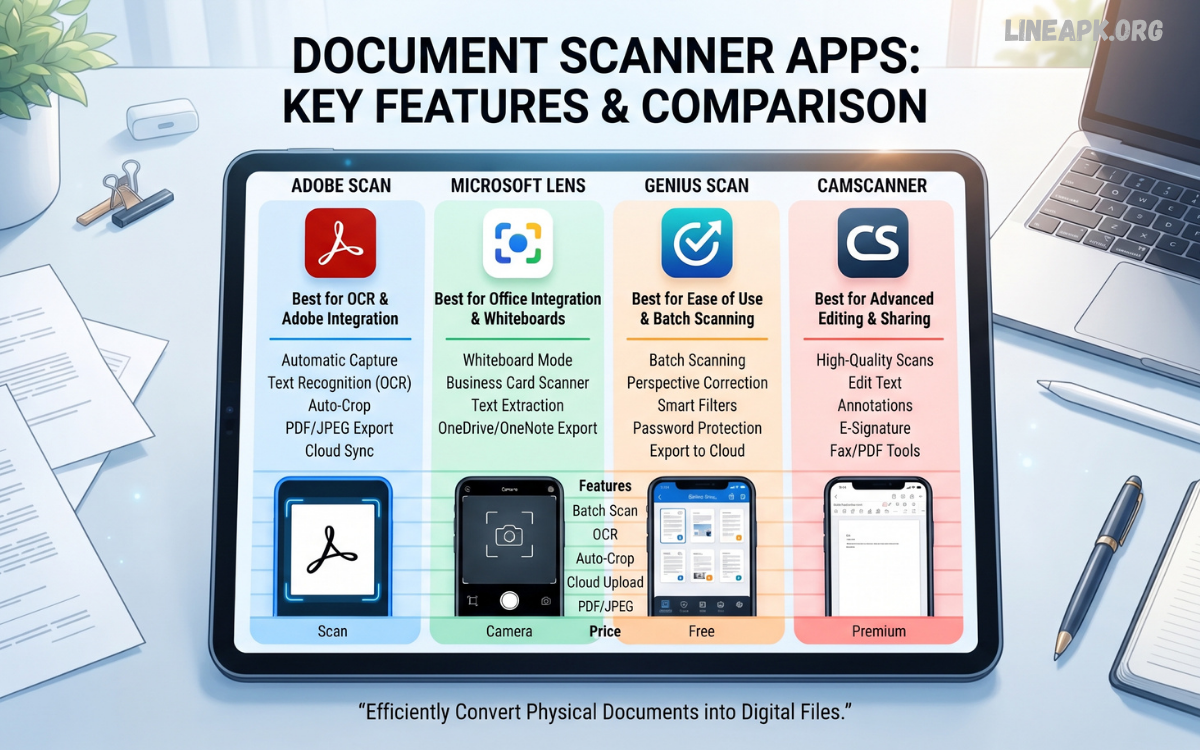
In today’s digital world, carrying a traditional scanner everywhere is no longer necessary. Smartphones have powerful cameras that can capture high-quality images, while modern document scanner apps can transform those images into professional-looking digital documents within seconds. Whether you are a student, professional, business owner, freelancer, or everyday smartphone user, a reliable scanning app can make managing paperwork much easier.
Document scanner apps allow users to scan receipts, notes, invoices, contracts, forms, certificates, books, and other important papers directly from their smartphones. Many applications use advanced image processing and Optical Character Recognition (OCR) technology to detect document edges, improve image quality, remove shadows, and convert printed text into editable content.
What Are Document Scanner Apps?
Document scanner apps are smartphone applications designed to capture physical documents using a device’s camera and convert them into digital files. Most apps automatically identify the document’s borders and correct perspective so that the final scan looks clean and professional.
After capturing a document, users can usually adjust brightness, contrast, sharpness, and color settings. The scanned file can then be saved as an image or PDF. Advanced applications may also use OCR technology to recognize text and make scanned documents searchable or editable.
How Do Document Scanner Apps Work?
The scanning process is generally simple and can be completed in a few steps. First, the user opens the scanning application and points the smartphone camera toward the document. The app detects the document’s edges and captures an image.
Modern scanning technology can automatically correct tilted pages and perspective distortion. Image enhancement tools then improve readability by adjusting lighting, contrast, and sharpness.
Key Features to Look For
Not every scanning application offers the same features. Choosing an app with the right capabilities can make a significant difference in document quality and productivity.
Automatic Edge Detection
Automatic edge detection identifies the boundaries of a document and helps remove unnecessary background areas. This feature makes scanning faster because users do not have to manually crop every page.
OCR Technology
Optical Character Recognition is one of the most valuable features in advanced scanner apps. OCR converts text from an image into machine-readable content. This makes it possible to search, copy, and sometimes edit information from scanned documents.
PDF Creation
PDF support is important for users who frequently submit documents online. A good scanner app should allow multiple pages to be combined into a single PDF file.
Image Enhancement
Lighting conditions are not always ideal when scanning documents with a smartphone. Image enhancement tools can improve readability by correcting brightness, contrast, shadows, and perspective.
Multi-Page Scanning
Multi-page scanning allows users to capture several pages and combine them into one document. This is especially useful for contracts, assignments, reports, and lengthy forms.
Cloud Storage
Cloud integration makes documents accessible across multiple devices. Depending on the application, users may be able to save files to supported cloud storage services and retrieve them later.
Document Organization
As your digital archive grows, organization becomes increasingly important. Folders, file names, tags, and search functions can help users quickly locate important documents.
Security Features
Documents can contain sensitive information, so privacy should be a priority. Look for applications that provide secure storage, encryption, password protection, or other appropriate security controls.
Benefits of Using Document Scanner Apps
Convenient and Portable
A smartphone is easier to carry than a traditional scanner. With the right application, users can scan documents at home, school, work, or while traveling.
Saves Time
Traditional scanning often requires a computer and dedicated hardware. Mobile scanning apps simplify the process by allowing users to capture and save documents directly from their phones.
Reduces Paper Clutter
Digitizing paperwork can reduce the amount of physical storage required. Important receipts, notes, invoices, and forms can be organized digitally instead of occupying drawers and filing cabinets.
Easy Document Sharing
Once a document has been scanned, it can usually be shared quickly through email, messaging platforms, or cloud services. This is useful when documents need to be submitted or reviewed remotely.
Supports Digital Workflows
Businesses and professionals increasingly rely on digital documentation. Scanner applications can help convert physical paperwork into digital files that are easier to store, organize, and process.
Useful for Students
Students can scan handwritten notes, textbook pages, assignments, forms, and study materials. Digital copies can be stored for later reference and organized by subject or project.
Best Uses for Document Scanner Apps
There are many situations where mobile scanning can be helpful.
Scanning Receipts
Keeping digital copies of receipts can make expense tracking and record management easier. Users can scan receipts immediately instead of worrying about losing physical copies.
Digitizing Notes
Students and professionals can create digital backups of handwritten notes. This can be particularly useful for organizing research and study materials.
Managing Business Documents
Small businesses can use scanner apps to digitize invoices, forms, purchase records, and other paperwork. Digital files are easier to organize and share with authorized team members.
Creating Digital Copies of Forms
Many organizations require users to submit completed forms digitally. A scanner app can convert a completed paper form into a shareable PDF.
Preserving Important Papers
Scanning important documents creates a digital backup. However, users should still follow appropriate legal and organizational requirements for storing original documents.
Document Scanner Apps vs. Traditional Scanners
Traditional scanners can provide excellent image quality and are still valuable for offices, libraries, and professional environments. However, they require dedicated hardware and are not convenient for mobile situations.
Document scanner apps offer greater portability and convenience. They can be used almost anywhere and are generally sufficient for everyday paperwork.
Read Also: PDF Reader Apps for Android: Best Options for Reading and Managing PDFs
How to Choose the Right Document Scanner App
Before installing a scanner application, consider what you actually need.
First, check whether the app supports the file formats you require. PDF is particularly useful for professional documents, while image formats may be suitable for quick references.
Next, consider OCR capabilities if you need to extract text from scanned documents. If you frequently scan several pages, look for multi-page scanning and document merging.
Tips for Getting Better Scans
Even the best document scanner apps depend on the quality of the original photograph. Place the document on a flat surface and ensure there is enough lighting.
Avoid placing your hand or phone shadow over the page. Hold the smartphone steadily and keep the camera parallel to the document whenever possible.
Are Document Scanner Apps Safe?
The safety of a scanner application depends on how it handles user data, permissions, and stored documents. Since scanned files may contain private information, users should choose reputable applications and review their privacy policies.
Avoid scanning highly sensitive documents through unfamiliar applications without understanding how the information is processed or stored. Keep applications updated and use available security features such as passwords or protected storage when appropriate.
The Future of Mobile Scanning
Mobile scanning technology continues to become more sophisticated. Artificial intelligence and improved image processing are making it easier to recognize documents, improve image quality, extract text, and organize digital files.
Future scanning applications are likely to provide increasingly intelligent document management features. Automated categorization, improved handwriting recognition, smarter OCR, and seamless integration with productivity platforms could make smartphone scanning even more useful.
Frequently Asked Questions
What are document scanner apps?
Document scanner apps are smartphone applications that use the device’s camera to capture physical documents and convert them into digital files, commonly PDFs or images.
Can document scanner apps create PDFs?
Yes. Many scanner applications can convert one or multiple scanned pages into PDF files that can be saved, shared, or organized digitally.
What is OCR in a scanner app?
OCR stands for Optical Character Recognition. It identifies text within scanned images and converts it into machine-readable text that can often be searched or copied.
Can I scan multiple pages with a smartphone?
Yes. Many modern applications support multi-page scanning, allowing several pages to be combined into one digital document.
Are document scanner apps free?
Some scanner apps offer free basic features, while others provide additional tools through subscriptions or paid versions.
Can scanner apps improve blurry documents?
Image enhancement features can improve contrast, brightness, and readability, but they cannot always restore severely blurred or damaged text.
Can I scan handwritten notes?
Yes. Scanner apps can capture handwritten notes as images or PDFs. However, handwriting recognition accuracy varies between applications.
How can I get better-quality scans?
Use good lighting, place the document on a flat surface, keep the smartphone steady, and ensure the entire page is visible before capturing it.
Are scanned documents stored online?
Some applications offer cloud storage or online processing, while others allow files to remain locally on the device. Check the app’s privacy and storage settings.
What is the best document scanner app?
The best option depends on your needs. Consider scanning quality, OCR, PDF support, security, cloud integration, document organization, and overall ease of use before choosing an application.
Conclusion
Document scanner apps have transformed smartphones into convenient portable scanning tools. They make it possible to digitize paperwork, create PDFs, extract text, organize files, and share documents without relying on traditional scanning equipment.
For students, professionals, businesses, and everyday users, these applications can save time and reduce paper clutter. Features such as automatic edge detection, OCR, image enhancement, multi-page scanning, cloud integration, and security controls make modern scanner apps much more capable than basic camera applications.
